
The choice of a email builder happens too often by default because it is imposed by management, because it is already in place, or because the decision is up to people who are not the ones who will use it on a daily basis.
Result: frustration among operational teams, inconsistent emails from one campaign to the next, and declining production.
Two families of tools recur throughout the article:
- standalone email builders (LePatron, Stripo, Dartagnan, etc.), which do only that
- the built-in email builders found in routing tools (Actito, Selligent, SFMC, Adobe Campaign, HubSpot, etc.), which are available as drag-and-drop modules within the ESP (Email Service Provider, the solution that routes your campaigns).
Here are the ten questions we systematically ask our clients before they choose their email production method, which we covered in the Live session: watch the replay.
1. Validate the design feasibility
First of all, you need to know What is the state of design maturity and what level of detail we want to produce with a builder. A design may look simple on a mockup but turn out to be a real headache to reproduce using drag-and-drop..
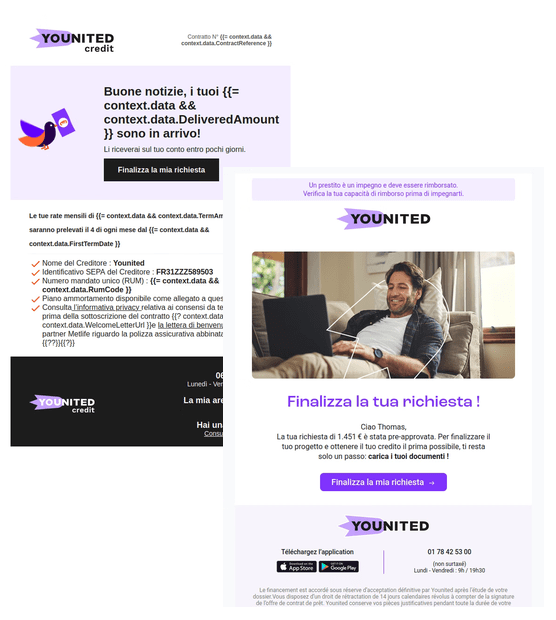
We saw this at Younited Credit A cover-type block combines a background image, editable icon, two-color title, paragraph, and button, all within an overflowing frame with a drop shadow. A difficult exercise for many email builders.

At Challenges, the visual identity relies on very subtle elements: external margins, borders, rules extending from the middle of a title, custom fonts, specific underlines. Once lost in a more limited builder, these elements make all brand recognition disappear.
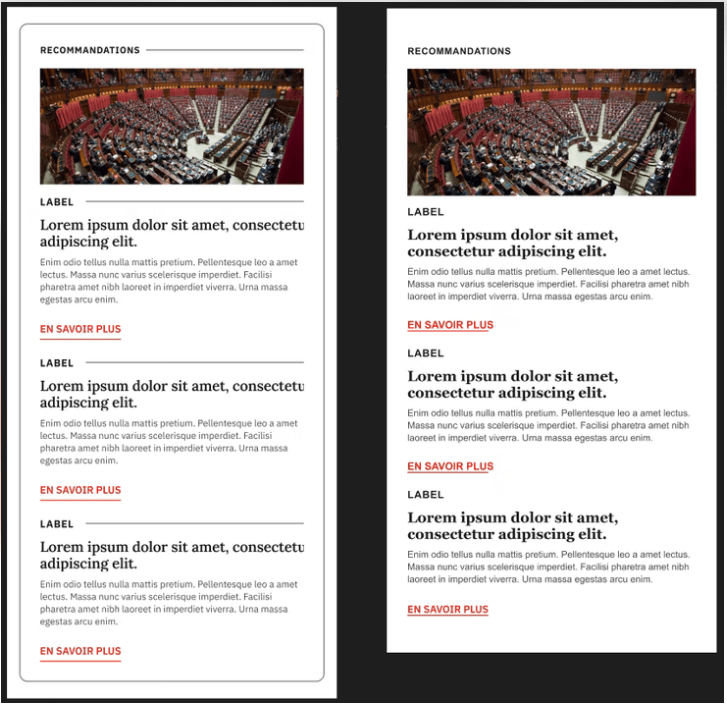
The assessment is straightforward: a sleek design is generally easier to replicate in a standalone builder than in a builder integrated into a router. At Challenges, Several builders were tested beforehand via POCs (Proof of Concept) before making a decision, and it was ultimately not the builder integrated into the client's router that was chosen, for lack of being able to ensure design fidelity.
2. Who is going to use the tool on a daily basis
An email builder is aimed at very different profiles : marketing and CRM teams on one side, designers and integrators on the other. They neither have the same level of proficiency with the tool nor the same goals.
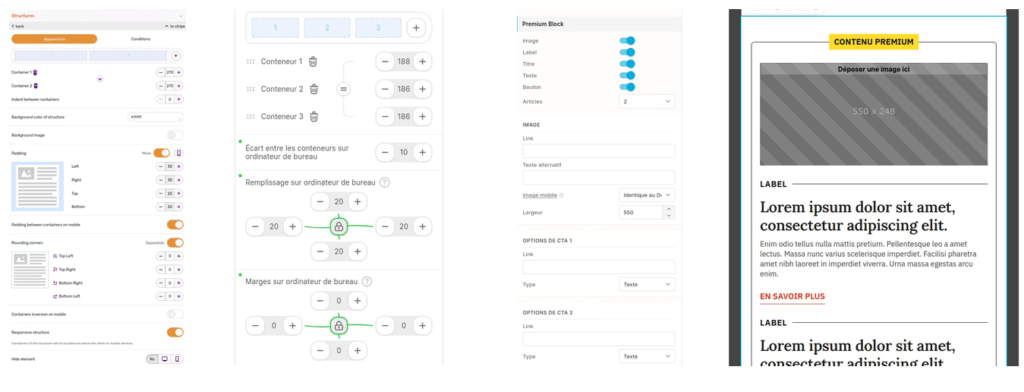
A designer cares about calculating margins, gutters, and column divisibility. A marketing team mostly wants to define what it needs by campaign type: a headline, a subheading, a CTA for a promotional email, a category, a title, a CTA for a newsletter. The promise of drag and drop is to put the technical side aside. Except that as soon as content is removed or added to a multi-element block, you often have to re-verify all the margin values on desktop and mobile.
A setup that was working well can end up broken after a simple content change, without the user understanding why.
3. Choose between creative freedom and brand safety
This is the main sticking point when choosing a builder.
On the one hand, an open model (like Stripo) or BeeFree): the same raw material for all advertisers, a great freedom of composition, but also the risk of straying from its visual identity.
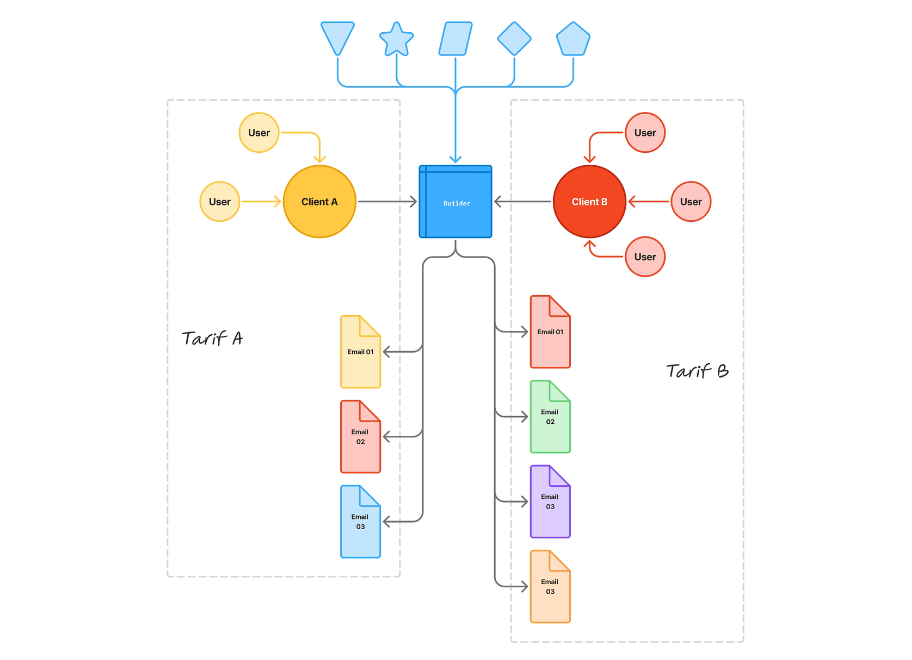
On the other hand, a more restricted model, designed « design system », where the options available in the interface adapt to the needs expressed by the advertiser, even to the point of technically preventing the use of a color or font outside the brand guidelines.
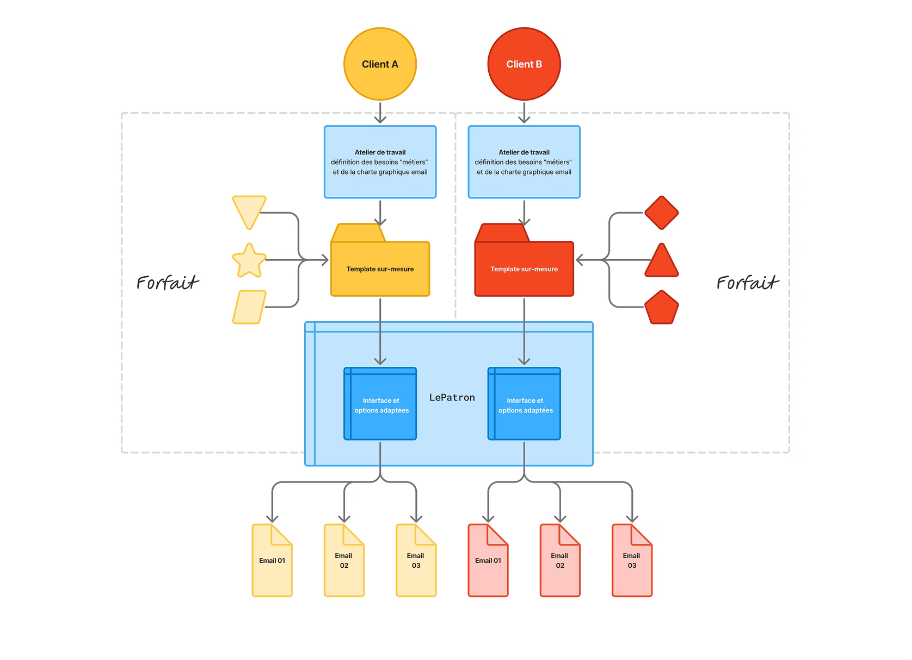
The choice depends on the brand's maturity and team turnover. An identity that evolves quickly (events, for example) lends itself well to an open tool. A large organization with high turnover, where individual subjectivity ends up eroding brand consistency, benefits more from a stricter framework.
4. Assess the complexity of your structure
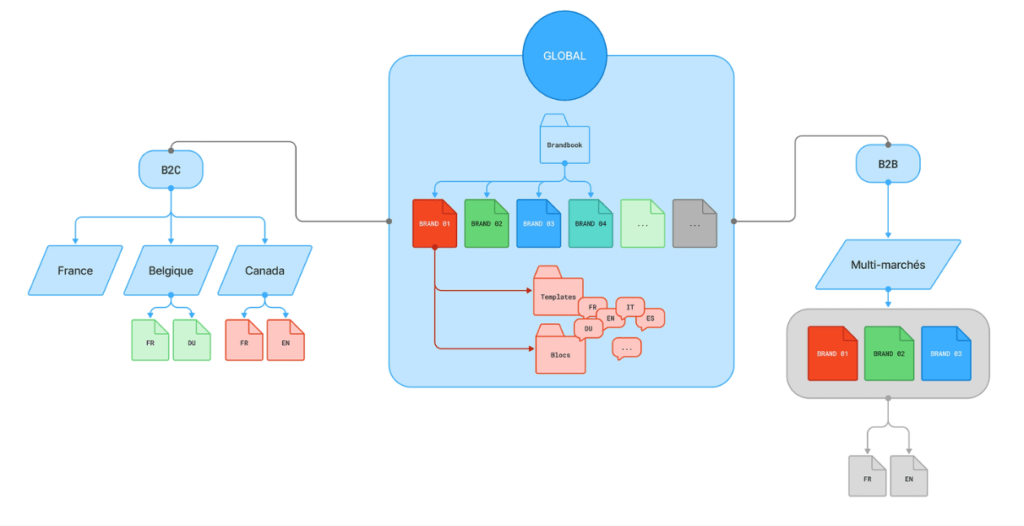
Multi-brand, multi-language, multi-market, multi-router: the more branched the organization, the more certain builders are put in difficulty.
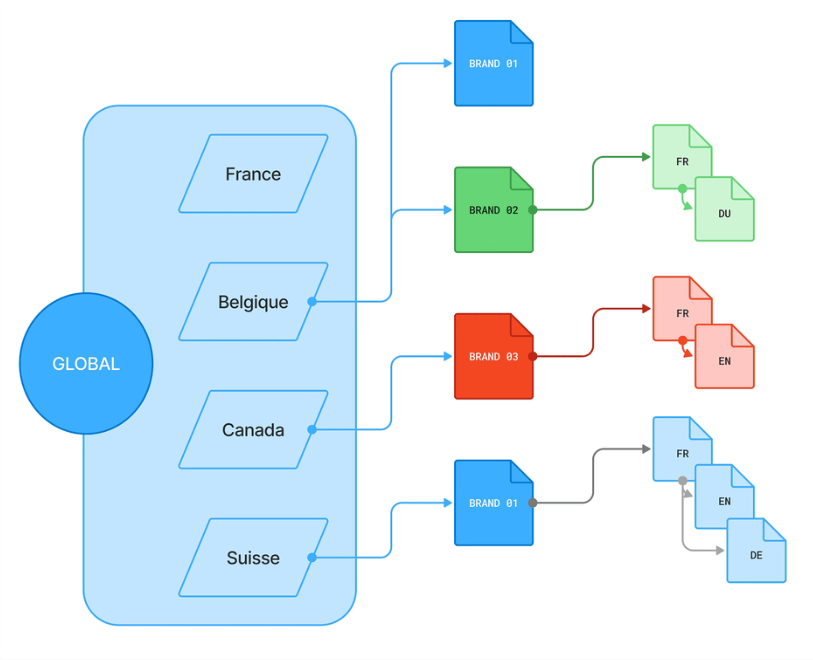
A common pattern among the large corporations and mid-cap companies we support: a global management team oversees multiple markets (France, Belgium, Canada, Switzerland), with each market managing its own brands and language variations.
The multi-router deserves special attention when emails do not systematically originate from the same ESP, an independent builder guarantees template consistency upon export, regardless of the routing tool used behind the scenes.
This article is freely available.
It took time and expertise!
Ce mois-ci, merci à nos clients-sponsors : Actito, Adeo Services, AG2R La Mondiale, BPI France, Cardif, Citeo, Clarins, CMI France, Engie, France Télévisions, Le Parisien, Les Echos, Les Furets, Pierre Fabre, Sysco, UMR, Voyageurs du monde… Grâce aux missions qu’ils nous confient, nous pouvons rédiger et partager du contenu gratuit. Ils soutiennent notre travail d’éducation pour promouvoir un email plus responsable. Become a customer and benefit from our expertise while supporting the production of open knowledge.
5. Framing production, beyond the tool
The tool and its features are never enough on their own.
In large organizations, information loss spreads quickly: if a builder is too locked down for one-off needs (like Black Friday), teams work around it (exporting, tinkering with HTML code), often without management realizing it.
Our recommendation: set up a cross-functional team (design, integration, copywriting, data, CRM) and document two things alongside the tool, a editorial framework (how to write a sales email, a newsletter, a transactional email) and a document of design system (which block to use, for which campaign type).
Another good practice: organize regular retrospectives, reviewing a sample of sent emails with a design, copywriting, and CRM referent, to identify what is working and what needs to be fixed. The frequency depends on the team's size and the volume produced, but the principle must exist, regardless of the chosen rhythm.
6. Master quality over time
A design system is never set in stone. Rules evolve: Outlook updates its rendering engines, email service providers (La Poste, Orange, Gmail, etc.) change how they interpret HTML and CSS, and a switch to a new ESP can call everything into question. What was validated at time T, including past in testing tools like Email on Acid, can degrade over time if no one is watching him.
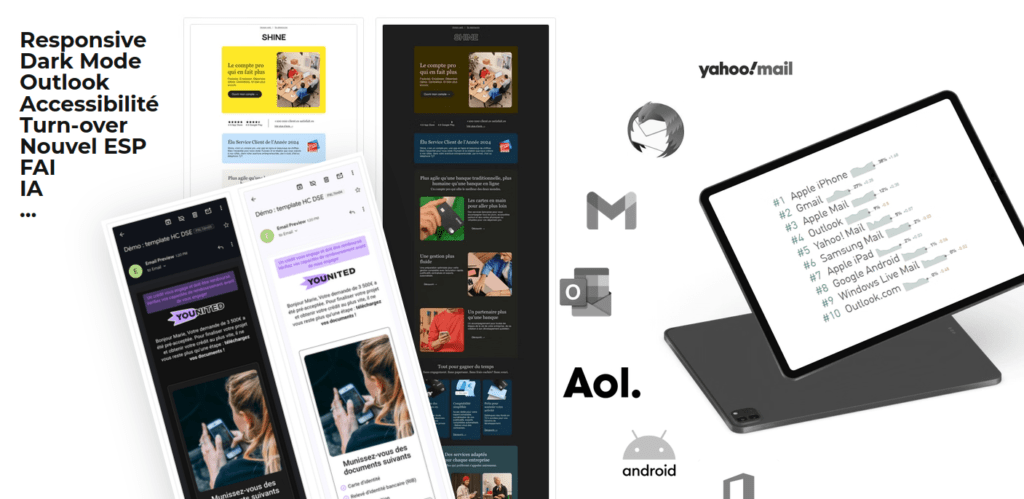
The question to ask beforehand: is the code produced by the builder scalable? Can an element be finely corrected without rebuilding everything? Not all tools offer the same flexibility on this point.
7. Update your templates
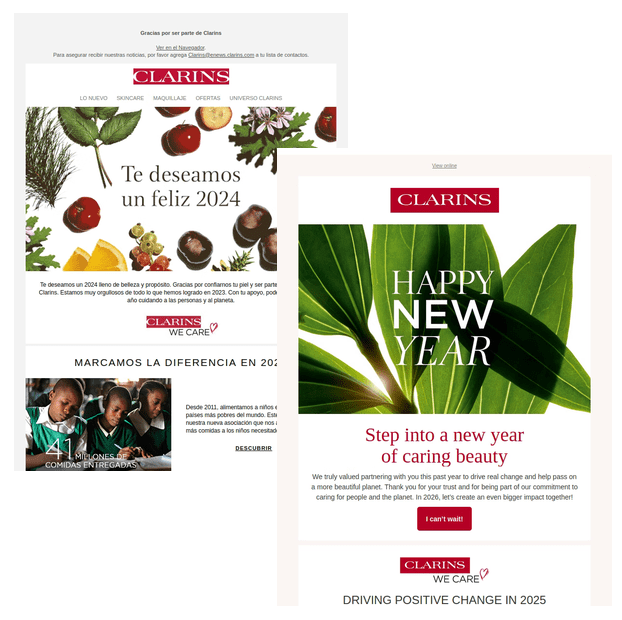
A design system is living, not monolithic. Evolution can remain minor (a logo, a typography, a color change, like at Clarins) or go further, with the addition of entirely new blocks linked to new business needs.
At Younited, for example, blocks oriented around credit simulators or payment schedules were born from precise CRM objectives.
This is the role of the cross-functional team mentioned above: escalate the needs, design the corresponding block, integrate it into the builder, rather than letting a business team cobble something together a block that she does not have the skills to produce correctly.
8. Access and exploit data
Almost all builder requests include, sooner or later, a need for customization. The real question is not «can we do customization?», the answer is almost always yes with an independent builder, but « What level of personalization do we actually need to leverage? ".
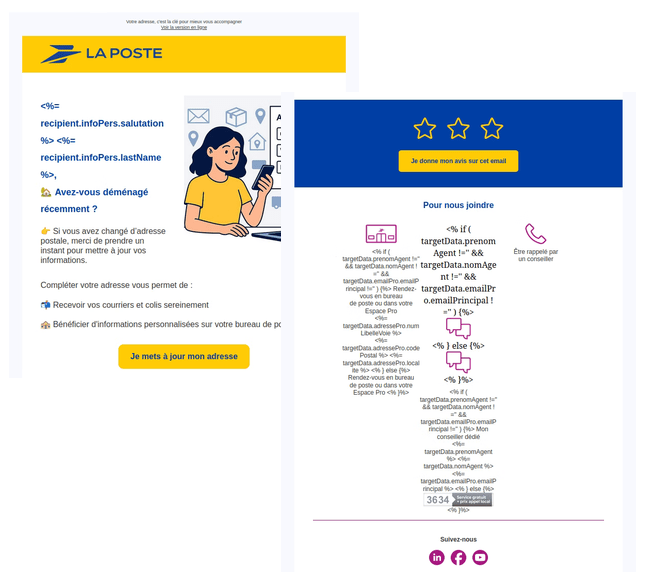
In practice, many advertisers limit themselves to civility, first name, and last name. Others go further: La Poste, for example, uses conditional content with geolocation of the physical point closest to the recipient.
The press and media sector (editorial feed aggregation) and e-commerce (product recommendation) are the ones that make the most use of this type of feature.
One point to know: with an integrated builder directly to the data source (CRM, ESP), we can preview the rendering with actually interpreted data, an advantage that a third-party builder, not connected to this data, does not offer.
9. Questioning dependency
Behind a request to change the email builder is often hidden a broader reflection on’technical ecosystem, an ESP migration project, for example.
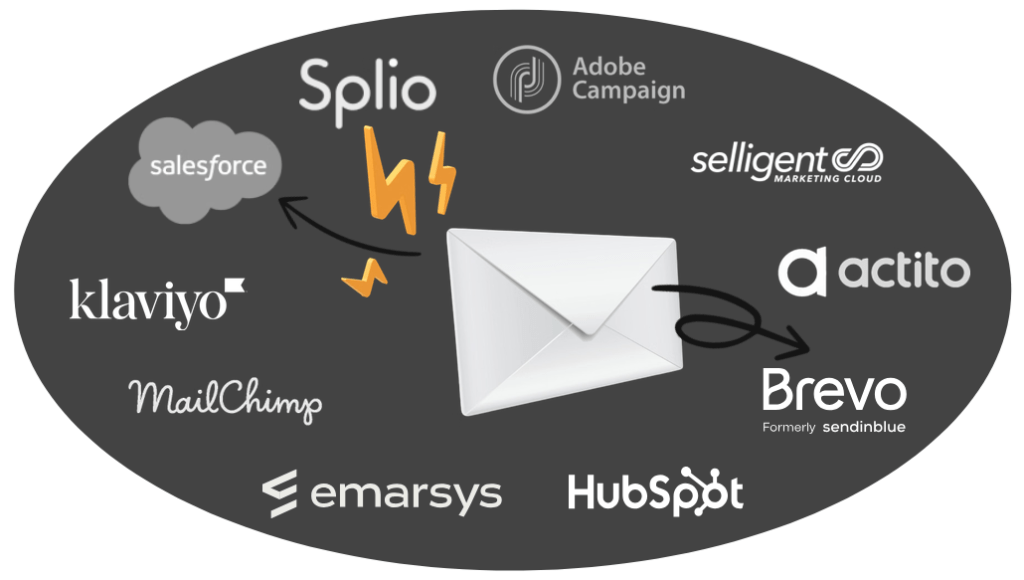
If all the templates were built with the drag-and-drop module specific to a given ESP, migrating to another routing tool means rebuilding all of that work in a new integrated tool. The exported HTML is not enough to recover the original editability.
This issue of dependency is all the more sensitive today with the recent recommendations from the CNIL (French Data Protection Authority) on the open pixel, which complicate matters for organizations reliant on American tools. An independent router builder limits this risk: templating work remains guaranteed, regardless of the ESP used for sending.
10. Estimate the full cost
The displayed price of a license, sometimes a few tens of euros per month per user, never reflects the true cost of production.

Behind it, there is the scoping workshop, the specifications, the drafting of editorial framework and design system documents, setup configuration, the production of desktop and mobile layouts, followed by hosting, support, and team training.
A good portion of this investment is concentrated in the first year and is amortized over the following two to three years.. Hence the value of looking beyond the price of the license before committing: it is better for this production work to last longer than six months.
In summary
Price remains, in practice, the criterion that comes up most quickly in an email builder decision, and pooling costs via the existing ESP is a natural temptation. But this saving can turn out to be a false economy if the tool doesn't hold up on design, governance, or long-term dependency. Escalating these ten questions to brand management before making a decision remains the best way to avoid regrets six months down the line.

Leave a Reply