
In 2025, we worked with over 20 organizations on their email deliverability challenges. From start-ups to large corporations, in various forms and with different impacts, the same issues invariably come up. The implementation of deliverability recommendations, on the other hand, changes according to the context.
This article summarizes the 10 deliverability tips that we donated the most this year, with concrete recommendations (anonymized) from our missions. I hope this article will enable you to further enrich your deliverability expertise !
In this live chat, Jonathan Loriaux and Marion Duchatelet discuss the 10 deliverability tips we've given the most this year, with concrete recommendations (anonymized) from our missions.
The link to the live site is : https://www.youtube.com/watch?v=eTcxrXhffi4
1. Structure your deliverability monitoring
Report The vast majority of our customers have no dashboard dedicated to deliverability. They only look at overall marketing performance (open rates, clicks), with no analysis by ISP.
On our 2025 missions, this observation is systematically made: the lack of deliverability dashboards makes it difficult to rapid detection of’deliverability incidents, lack of structured monitoring preventing’identify gradual deterioration in reputation.
In many cases, the first step was to set up Google Postmaster Tools and Microsoft SNDS were simply not configured, even though these free tools are essential.
Detailed recommendation :
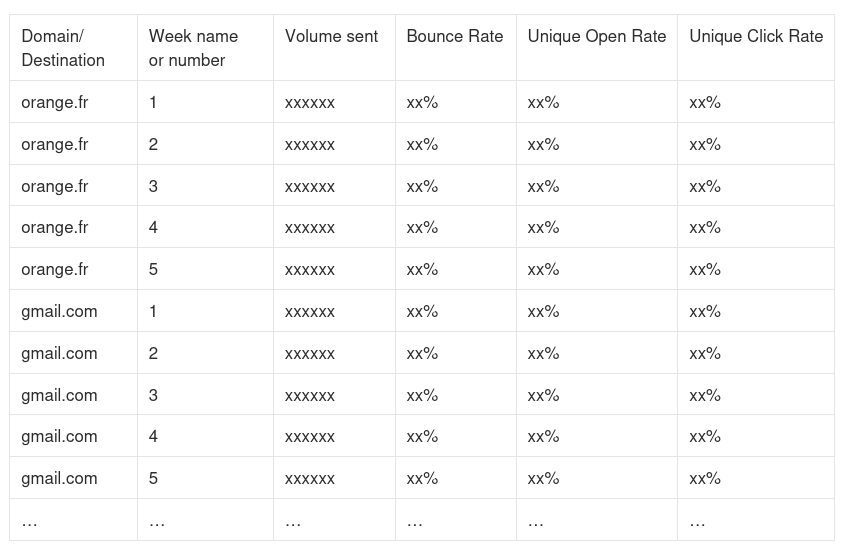
- Tracking performance by destination (Gmail, Outlook, Orange, Free, SFR, Yahoo) and not globally: an incident rarely affects all ISPs simultaneously. Differentiating between them enables more effective detection.
- Monitor the evolution of bounces (hard/soft/block) over time to detect changes
- Analyze trends over weeks/months, not just individual campaigns
- Configure Google Postmaster Tools (domain/IP reputation, complaint rates, authentication errors, feedback loops)
- Configure Microsoft SNDS (IP reputation at Outlook/Hotmail, spam trap rates)
- Add seedlist tests where possible (inbox vs. spam placement)
- Compare performance between flows (marketing vs. transactional) and between brands/BUs
Concrete action :
- Create a centralized dashboard with three views: daily (incident detection), weekly (short-term trends), monthly (reputation trends)
- For each destination, track at least: volume sent, bounce rate (hard/soft/block), open rate, click rate, complaint rate if available.
- Configure Google Postmaster Tools: add all your sending domains and subdomains
- Configure Microsoft SNDS: register all your sending IPs
- Implementing automatic alerts if an indicator exceeds normal thresholds (e.g. bounce rate > 2%, drop in opening rate > 20%)
- Plan a 15-minute weekly review to analyze trends
Profit Structured monitoring enables deliverability incidents to be detected in a matter of hours rather than days, and action to be taken before reputation is too severely damaged. Incidents are easily detected by visualizing that a destination is falling behind on one indicator while others remain stable.
This article is freely available.
It took time and expertise!
This month, thanks to our customer-sponsors: Actito, BPI France, Cardif, Citeo, Clarins, CMI France, Editis, Engie, France Télévisions, Le Parisien, Les Echos, Les Furets, Pierre Fabre, UMR, Voyageurs du monde... Thanks to the missions they entrust to us, we can write and share free content. They support our educational work to promote more responsible email. Become a customer and benefit from our expertise while supporting the production of open knowledge.
2. Separate marketing and transaction flows
Report : Many organizations send all their e-mails from the same domains and IPs, mixing up newsletters and critical transactional emails (order confirmations, password resets, important notifications).
On our 2025 missions (but this is nothing new), we found that this lack of separation exposed critical flows to incidents in marketing flows. The risk: a deliverability incident on an aggressive promotional campaign can impact the deliverability of transactional emails, whose deliverability rate must remain very close to 100%.
Detailed recommendation :
- Use of distinct sub-domains by type: newsletter.marque.fr (marketing campaigns), transac.marque.fr (transactional), alert.marque.fr (notifications), service.marque.fr (customer service) ...
- If possible, use Dedicated IPs or different shared pools for each flow (especially for large volumes)
- Capitalize on the main domain of the brand in the visible FROM (e.g. contact@newsletter.marque.fr) to maximize recognition rather than under “false” domains (e.g. contact@news-marque.fr)
- Don't multiply the number of sub-areas too much: 3-4 are usually enough (transac, hot marketing, cold marketing, service).
Concrete action :
- Map all your current mailing flows and classify them according to two axes: quality (engagement rate) and strategic importance
- Define 3-4 flow typologies and allocate dedicated sub-areas to them (give priority to recycling existing sub-areas with a positive history rather than creating new ones).
- Plan gradual migration: start with transactional flows (easier), then marketing.
- Set up a heating plan if you are creating new sub-domains: start with small volumes to your most engaged contacts, then gradually increase over 2-4 weeks
- Document the final architecture: which flow uses which sub-domain, why, and who's responsible
Profit Flow separation creates relative reputational isolation You'll have less impact on your critical transactional emails if something goes wrong with your marketing campaigns. Your order confirmations and password reset emails will continue to arrive even if you have a problem with a newsletter. This separation also facilitates diagnosis (which flow is causing the problem?) and enables you to apply differentiated strategies (frequency, management of inactives, etc.).
3. Configure SPF, DKIM and DMARC correctly
Report : L’technical email authentication is regularly incomplete or misconfigured. On our 2025 missions, we found that DMARC is still too often absent or in «p=none» mode, and above all without active monitoring of reports.
Detailed recommendation :
- SPF Validate that all sending servers are authorized and limit the number of includes (maximum 10 DNS lookups). Beware of excessively long strings, which generate errors and compromise authentication.
- DMARC p=none to p=reject. Above all, set up active monitoring of RUA/RUF reports to identify legitimate sending sources and spoofing attempts.
Concrete action :
- Update the reporting email addresses of all DMARC records to point to the same internal mailbox or DMARC monitoring service.
- Subscribe to a DMARC monitoring which allows you to easily analyze the quality of your authentication and set up automatic alerts.
- Improve authentication of your legitimate outgoing flows before tightening DMARC policy
- Once you have switched to a DMARC rejection policy, consider deploying BIMI and Apple Branded Email.
Profit Correct authentication and a strict DMARC policy protect your brand against phishing and significantly reduce deliverability risks. Leading messaging services now require DMARC, SPF and DKIM for high volumes. Bonus: you can then implement BIMI (brand logo in inbox) if you have p=quarantine or p=reject.
4. Clean up and manage inactives
Report : Virtually none of our customers has a structured inactive management strategy. In terms of our 2025 missions, it's an alarming observation, given that this is largely the the best way to improve your deliverability reputation.
Detailed recommendation :
- Define a clear inactivity threshold adapted to your context. For example: 180 days for intensive marketing, 365 days for less frequent communications
- Implement a strategy to reduce sales pressure on inactive contacts
- Stop mailings definitively after a certain period of inactivity
- Apply stricter rules to sensitive domains (such as Microsoft) where the impact on reputation is more rapid
- In B2B deliverability, to take into account the the problem of opening and clicking robots that distort KPIs
Concrete action :
- Better understand your database by segmenting it according to the last interaction (30d, 90d, 180d, 365d+)
- Permanently exclude totally inactive contacts from your marketing mailings
- Reduce marketing pressure on people who are becoming inactive
- Document and automate this process so that it is applied on an ongoing basis
Profit It may be counter-intuitive, but reducing the volume of emails you send will most often improve your open and click rates, as well as the sales generated by your email marketing. And above all, you'll protect your sender reputation. ISPs and webmails prefer senders who send to engaged audiences.
5. Treat bounces correctly
Report : The bounces management rules are often inadequate, poorly configured or non-existent, particularly when it comes to distinguishing between softbounces and blockbounces. A mismanaging bounces can be extremely damaging. for your deliverability... but also for your database if they're badly categorized.
Detailed recommendation :
- Hardbounces Immediate and definitive quarantine on first failure (non-existent address, invalid domain)
- Softbounces Shutdown after 3 to 5 consecutive failures over a 3-4 week period (box full, server temporarily unavailable)
- Blockbounces NEVER count them as classic softbounces. Analyze the causes (reputation, content, volume) and treat the problem at source. Blockbounces must not lead to exclusion of the recipient's address.
- Synchronize rules between all your sending platforms to prevent an address blocked on one platform from continuing to receive from another.
- Monitor overall bounce rate (target: < 1% in B2C and < 2-3% in B2B)
Concrete action :
- Audit current bounce management parameters on each platform, and request additional information from support if necessary.
- Standardize rules: hardbounce = immediate exclusion, softbounce = max. 5 attempts over 30 days
- Create shared exclusion segments between platforms if you use several tools
- Set up alerts if the bounce rate exceeds 4 or 5% on a campaign
Profit Continuing to send to invalid addresses sends a negative signal to messaging services and damages your sender reputation. Rigorous bounce management protects your reputation, reduces your sending costs and improves your statistics.
6. Synchronize spam complaints and unsubscribes between platforms
Report Spam complaints (like unsubscriptions) are not always synchronized between brands' different mailing platforms. A contact who complains on one feed continues to receive emails on another feed. This situation can quickly become penalizing from a marketing point of view. reputation deliverability.
Detailed recommendation :
- Configure all available Feedback Loops (Hotmail/Outlook, Yahoo, La Poste...) or check that this is done by your email tool.
- Automatically treat every complaint as a definitive unsubscribe on ALL your feeds
- Monitor complaint rates by campaign and destination (target: < 0.1%)
- Set up alerts if the rate exceeds 0.3% (critical threshold for some ISPs)
- Exclude complaints and unsubscribes on all the email tools you use
Concrete action :
- Check with your ESP that all available FBLs are activated and functional.
- Test the treatment: make a test complaint and check that the address has been excluded.
- Create global segments containing spam complaints and unsubscribes to be shared across all your platforms
- Add complaint rates to your monitoring dashboard
- Analyze complaint peaks: targeting problem? Inappropriate content? Frequency too high?
Profit A high complaint rate is the most negative deliverability signal for ISPs and messaging services. A poorly handled unsubscribe means an increased risk of generating spam complaints. Rigorous management of complaints and unsubscriptions protects your reputation and avoids blockages. Bonus: analyzing complaints helps you identify targeting or content problems before they have a massive impact on your deliverability.
7. Make it easy to unsubscribe (and take responsibility for it)
Report unsubscribe links are sometimes difficult to see, processes are complicated (login required, long forms), and one-click List-Unsubscribe header is regularly missing. On many audits in 2025, we found that the unsubscribe process required too many steps, was too difficult to find, or that the List-Unsubscribe link was not implemented, even though Gmail and Yahoo increasingly favor it in their interface.
Detailed recommendation :
- Visible, legible, high-contrast unsubscribe link in the footer of each email
- Ideally, you should also add an unsubscribe link at the top of the message.
- Implement the List-Unsubscribe header with the one-click method (RFC 8058) to enable unsubscribing directly from the webmail interface (risk of penalties in the event of absence).
- Process in just 1-2 clicks, with no need to log in
- Real-time processing (no 48-72h delay)
- Don't ask for justification or post guilt-inducing messages
Concrete action :
- Audit your templates: is the unsubscribe link visible in 2 seconds?
- Check with your ESP that the List-Unsubscribe (one-click) header is activated.
- Test the path: how many clicks? Do I need to log in? How long before it takes effect?
- (Bonus) Create a preference center to adjust frequency rather than all/nothing
Profit : Anyone who wants to unsubscribe will do so anyway. Might as well facilitate the process rather than pushing them to click on «spam» (much more damaging to your reputation). Gmail, Yahoo and many other messaging services now feature a clearly visible unsubscribe button. If you don't implement List-Unsubscribe, the recipient may opt for the spam complaint.
8. Control the frequency of mailings
Report : Many organizations don't have any rules about how often they send their e-mails. Spam filters are keen to see regularity, whether in terms of timing or volume. Any change in your sending behavior (and not just in frequency) will be seen as suspicious.
Detailed recommendation :
- Adopt a logic of frequency for your different mailings: the editorial newsletter every 1st Monday of the month, the weekly promotional email every Thursday...
- If you need to run exceptional campaigns, try to spread them out as evenly as possible.
- If you need to target a wider area than usual, try dividing your mailings into several waves.
- Coordinate between teams/brands In multi-BU organizations, avoid a single contact receiving emails from several entities without global coordination.
Concrete action :
- Create a dashboard showing your volumes sent per week and per day, so you can detect peaks in mailings and think about better organization.
- Inform the various teams of the deliverability and reputation impacts of irregular sending frequencies and email volumes.
- Document rules and communicate them to marketing teams to prevent circumvention
- Create a dispatch planning management tool including volume information.
Profit Improving the regularity of your mailings, whether in terms of frequency or volume, will help anti-spam filters not to be surprised by your sender behavior. By combining this logic with targeting your most active contacts, you can dramatically restore a reputation for poor quality (please allow a few weeks).
9. Adopt clear deliverability governance
Report In organizations with multiple brands, business units or delivery platforms, the architecture is often chaotic and undocumented. Lack of centralized documentation makes it difficult to diagnose and resolve incidents.
Detailed recommendation :
- Document the complete sending architecture: who sends what, from where, on which platform?
- Map all domains, sub-domains, IPs, platforms and their respective uses
- Establish a validation process prior to any new shipment flow
- Appoint a deliverability manager (even on a part-time basis) to centralize decisions
- Create an incident and corrective action register
Concrete action :
- Create a reference document (like a map) listing all your shipping flows
- For each flow: domain, subdomain, IP, platform, volume, type of content, responsible party
- Identify inconsistencies, duplicates, obsolete flows
- Define naming rules and an approval process for new flows
- Plan quarterly architecture review points
Profit Clear governance and up-to-date documentation enable you to better control your delivery infrastructure, detect incidents more quickly, facilitate the onboarding of new employees, and make informed decisions during migrations or platform changes. In the event of an incident, you save precious time.
10. Train teams in the fundamentals
Report Marketing and CRM teams often operate without any real knowledge of deliverability issues, and make tactical decisions (sales pressure, broad targeting, high frequency) that have a direct impact on the sender's reputation. On our coaching missions in 2025, an important part of the work consisted in train operational teams in the fundamentals of deliverability to integrate these criteria into their day-to-day decisions. Without this skill-building, best practices will not be applied in the long term.
Detailed recommendation :
- Train teams in the fundamentals: sender reputation, authentication (SPF/DKIM/DMARC), bounce management, spam complaints, importance of engagement
- Raise awareness of the impact of marketing decisions: over-targeting, excessive frequency, irrelevant content = reputational damage
- Create validation processes incorporating deliverability criteria before each mailing (checklist)
- Document internal best practices in a guide accessible to all
- Designate «deliverability relays» in each team
- Organize regular follow-up meetings to analyze incidents and share lessons learned
Concrete action :
- Organize an initial 2-3h training session for all teams sending emails
- Create an internal reference document: «Deliverability checklist before sending».»
- Integrate deliverability criteria into your campaign validation processes
- Set up a dedicated communication channel (Slack, Teams) for deliverability issues
- Organize quarterly feedback on incidents and lessons learned
Profit The transfer of skills is essential if best practices are to be implemented over the long term. Trained teams make better day-to-day decisions, detect problems earlier, and gradually become autonomous. The aim of external deliverability support should be to enable internal teams to manage 80% situations on their own.
Conclusion
These 10 deliverability recommendations are systematically repeated in our assignments because they are both :
- Fundamentals : They touch the pillars of deliverability
- Often neglected Lack of time, skills or prioritization
- High-impact : Their implementation significantly improves results
Deliverability is not a purely technical issue to be delegated to IT teams. It is a strategic issue that requires :
- Regular management
- Marketing/technical collaboration
- Measured but constant investment
Do you recognize your organization in these findings? Would you like to take stock of your deliverability? Contact us for a diagnosis

Leave a Reply