
Update — The initial article published in 2024 was about migrating Yahoo feedback loops. Since then, the Sender Hub has evolved significantly: it has become a true deliverability monitoring tool. Here's what has changed and, more importantly, how to take advantage of it.
In 2024, Yahoo!'s Sender Hub did only one thing: manage the complaint feedback loop (the Complaint Feedback Loop, or CFL). Useful, but limited. At the time, we hoped Yahoo would eventually offer an equivalent to the Google Postmaster Tools reputation indicators, complaint rates, volumes.
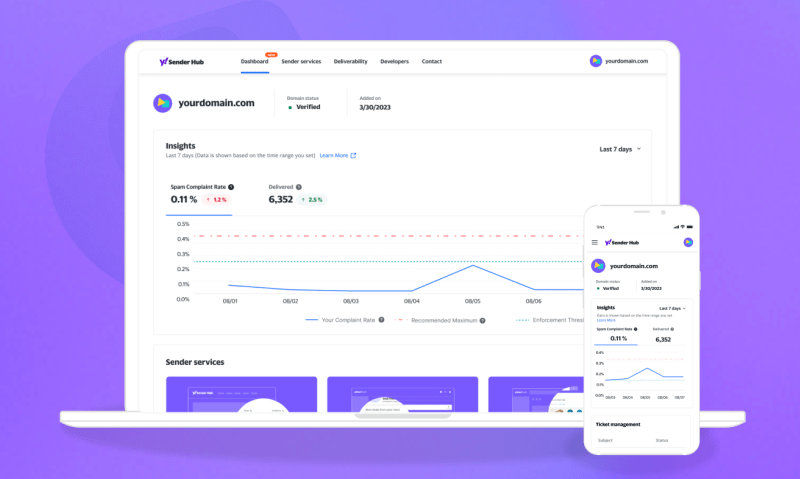
This is now the case (even if it's much less complete). In October 2025, Yahoo launched Insights, a feature that finally provides visibility into two essential indicators: the volume of emails delivered and the spam complaint rate. It is this new monitoring role, much more than complaint management, that makes the Sender Hub interesting today. This article explains what you can track and how to configure your domains to access it.
This article is freely available.
It took time and expertise!
This month, thanks to our customer-sponsors: Actito, BPI France, Cardif, Citeo, Clarins, CMI France, Editis, Engie, France Télévisions, Le Parisien, Les Echos, Les Furets, Pierre Fabre, UMR, Voyageurs du monde... Thanks to the missions they entrust to us, we can write and share free content. They support our educational work to promote more responsible email. Become a customer and benefit from our expertise while supporting the production of open knowledge.
What the Sender Hub allows you to track today
The Insights feature is located in the tab Dashboard from your Sender Hub account. Once activated for a domain, it displays statistics for email deliverability aggregated for your verified DKIM domains. Two main views are available.
1. Email volumes delivered
A graph shows you the total number of messages delivered over the chosen period (7 days, 30 days, up to 180 days). When you hover over it, you get the details by date. This is valuable for checking the regularity of your mailings, identifying a peak or a drop, or simply getting an idea of the volume Yahoo actually receives from you.
2. Spam complaint rate
This is arguably the most important indicator. The view displays your complaint rate over time, along with two reference thresholds:
- Recommended Maximum (0.1–1 TP9T) : the target not to exceed, in compliance with the common requirements for Yahoo and Gmail since February 2024.
- Enforcement Threshold (0.3 %) the threshold beyond which your deliverability is actively penalized.
The goal is to stay consistently below 0.1 %. Exceeding 0.3 % risks massive filtering into the spam folder.
A key point on calculating the Yahoo complaint rate
One question keeps coming up: why doesn't the complaint rate displayed by Yahoo match the one I calculate on my end? The answer lies in the calculation method: The complaint rate displayed in the Sender Hub is based solely on messages delivered to the inbox., not on all messages sent or accepted (which can end up in spam).
This is, according to Yahoo, the «true» complaint rate. It thus differs from in-house calculations that include filtered messages or those already marked as spam. In other words: it is the proportion of people who, after actually received your email in their inbox, chose to mark it as spam. A much more telling indicator for judging the relevance of your mailings.
How to add and validate your domains in the Dashboard
To access data from a domain, you must add it and then prove ownership via DNS. Here is the complete procedure.
- Create a dedicated Yahoo account for your team. To date, Sender Hub does not allow sharing access among multiple users: one account only sees the data for verified domains. in this account. Therefore, avoid using a personal Yahoo account. Instead, create a «team» account (with an internally shared address) that multiple people can use and that will outlast departures.
- Connect to Sender Hub with this account on senders.yahooinc.com.
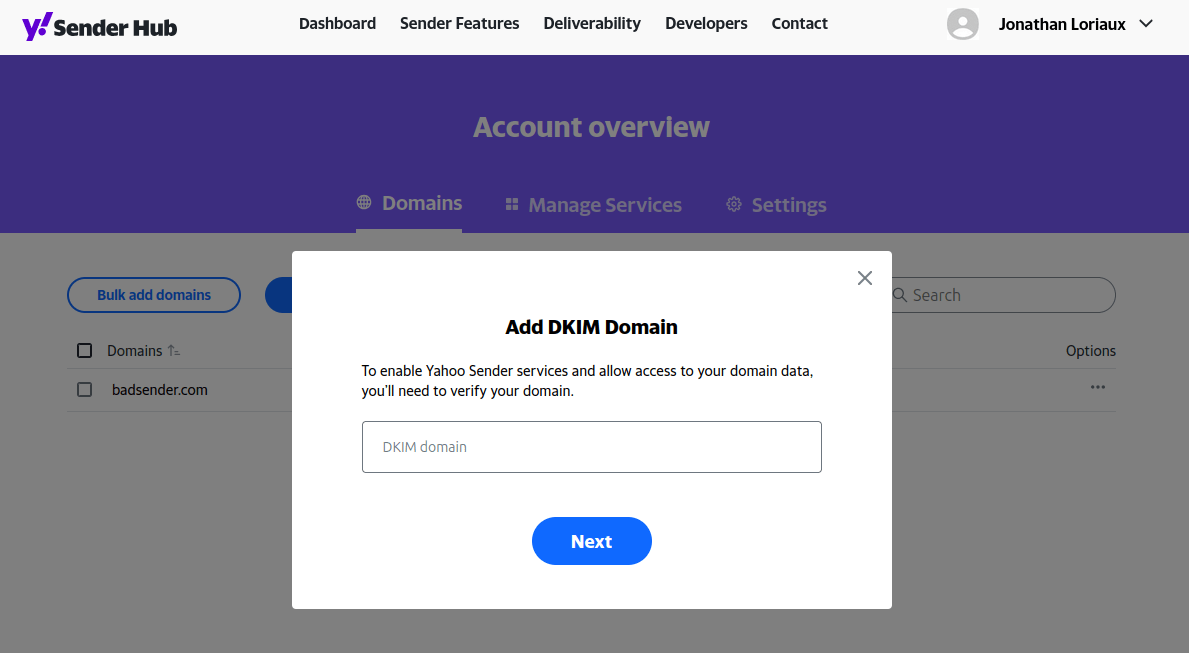
- Go to the domain management page : senders.yahooinc.com/feature-management/account-overview/ or via Manage domains in the Dashboard). Click Add a domain.
- Add your domain or subdomain. Enter your DKIM domain here (see the next section to identify it correctly, it's normally the domain used in your From: field). Our advice: add both your root domains and your sending subdomains, to cover all cases. To manage a large fleet, the button Bulk add domains allows you to import up to 100 domains at a time via a CSV file.
- Retrieve the TXT verification record. Yahoo generates a record of type
yahoo-verification-key=.... Copy it and keep it in a file, making sure to note which domain it corresponds to. - Forward the TXT records to the person managing your DNS. Each domain added has its own record. This record will prove to Yahoo that your request to access the data for that domain is legitimate. If you manage multiple domains, group the records properly to make your DNS administrator's job easier.
- Finalize the check. Once the records are published in DNS, return to the Sender Hub to confirm. The domain status changes from Unverified à Verified.
- Activate Insights and wait. Select your verified domain and click Activate. The data is starting to fill in under 24 to 48 hours, provided the domain meets a minimum daily volume threshold. All times are displayed in Coordinated Universal Time.
What domains need to be added? The DKIM domain
The point that most often causes confusion: it's neither the From: visible, nor the envelope domain (Return-Path) that counts, but the beacon domain d= from your DKIM signature. This is the domain that allows Yahoo to identify the true sender of a message, and it is therefore the one that must be added and verified.
Three common scenarios:
- You sign with your own domain (
d=marque.com) : this is the domain you're adding. - Your router (ESP) signs with its own domain (
d=esp-router.com) : this is the domain that receives the data, and you generally do not have access to it. Inquire with your provider. - Signature aligned on a dedicated subdomain (
d=mail.marque.com,d=news.marque.com) : add this exact subdomain, not just the root domain.
How to find your DKIM domain? Open an email you've actually sent, display its source code / headers, and look for the line DKIM-Signature. The value after d= is your DKIM domain. If there are multiple signatures, it is generally the one aligned with your From: (in the DMARC sense) which is relevant.
This is a somewhat complicated explanation, but generally, it's the domain name of the «From:» address visible to your recipients that needs to be configured.
Read and interpret data from Yahoo Sender Hub
The two views complement each other: the volumes tell you How much You send it to Yahoo, the complaint rate tells you How is it received. The ideal scenario is to monitor both together; an increase in volume accompanied by a rise in the complaint rate is a classic warning sign.
One limit to know: With low volumes, the data is of little use. Insights requires a minimum daily volume threshold to display anything, and for a small shipper, the graphs remain sparse and statistically fragile. It’s a tool that truly makes sense from a certain volume of regular shipments to Yahoo.
It is highly likely that your reputation could also impact whether or not this information is visible.
And the rest of the Sender Hub?
Insights is just one piece of the whole. To put it in context:
The Complaint Feedback Loop (CFL). This service sends you a report (in ARF format) each time a recipient marks a message signed with an enrolled DKIM key as spam, so that you can remove this contact from your future campaigns. Important: If your ESP is already registered with the CFL and forwards complaints, you don't have to do anything yourself. Check with him before any manipulation, at the risk of duplicating or breaking an existing escalation.
Other features, rather intended for large shippers or ESPs: the Performance Feeds (Detailed inbox/spam placement and campaign performance data, by invitation only), the Subscription Hub (Centralized subscription management on the Yahoo user side), as well as BIMI, AMP, and Promotions & Schema.
Conclusion
With Insights, Yahoo is taking the step we've been expecting since 2024: offering senders direct visibility into their volumes and, more importantly, their actual complaint rate measured on the inbox side. It's not yet a complete Postmaster Tools, with no domain or IP reputation indicators, limited history, and still no multi-user access sharing, but it's a concrete and immediately useful advancement.
The key takeaway: create a team account, add your domains and DKIM subdomains: have them verified in DNS, and make it a habit to monitor your complaint rate against the thresholds of 0.1% and 0.3%. This is currently one of the best free indicators you have for your deliverability on Yahoo.
To access the Sender Hub: senders.yahooinc.com. And for details on Insights, the Official FAQ complete the Yahoo announcement.

Leave a Reply